WHY IMPLICIT
Everything your team needs, right inside Outlook
Eight powerful reasons why sales and marketing teams
choose Implicit to get more done every day.
Microsoft 365 & on-prem Exchange

Save Time & Boost Productivity
Eliminate context-switching by accessing, viewing, and editing CRM records without leaving Outlook. Browse, search, and update CRM data in real time.

Enhance Customer Engagement
Respond faster and more effectively with instant visibility into relevant CRM information and immediate side-panel actions - at your fingertips.

Increased CRM Adoption
Let users perform daily CRM activities in a familiar Outlook environment. Remove barriers to use and encourage greater, more consistent CRM adoption and utilization across your team.

Track & Archive Emails
Archive emails using a variety of available tools - from one-click to an advanced multi-record option and a rule-based auto-archiving engine - ensuring every customer interaction is accurately logged in CRM.

Seamless Data Synchronization
Keep Outlook contacts, calendars, meetings, and calls in sync with the CRM, maintaining a single source of truth across your entire organization.

Maintain Security & Control
Enforce CRM permissions inside Outlook to ensure data integrity and confidentiality, while giving administrators flexible configuration options to tailor the integration to your business needs.

Centralized Installation
Deploy the add-in via Microsoft 365 or Exchange on-prem admin center, enabling IT admins to centrally manage configuration and user access to the add-in.

Multi-Platform Support
Works across Microsoft 365, Exchange on-prem, Windows, Mac, Mobile, and Web. Full support for both classic and new Outlook - so your whole team is covered.
FEATURES
No extra steps, no learning curve,
just smarter work
Providing you with instant access and visibility into relevant
CRM records as you interact with your clients via Outlook,
enabling you to respond faster and more effectively.
Microsoft 365 & on-prem Exchange

Configurable Outlook Side-Panel
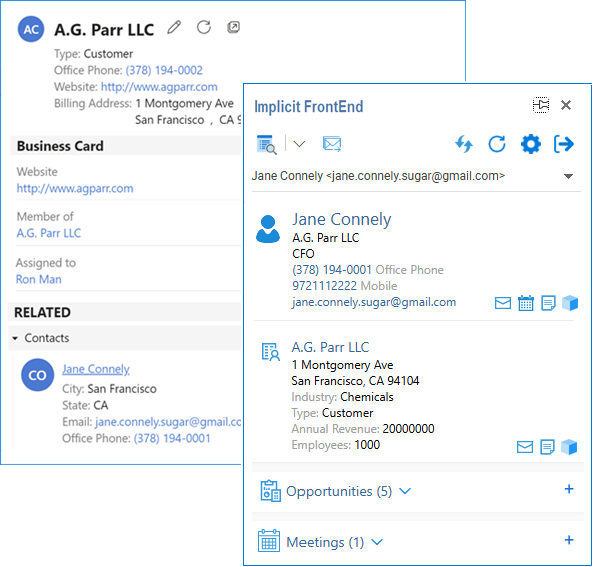
Side-panel shows context-aware CRM information alongside emails, enabling users to take quick, informed actions without leaving their inbox. It automatically identifies and displays CRM contact / account records and recent business activity. Fully configurable by your CRM admin.

Real-Time CRM Access from Outlook
Browse, view, update and create CRM records in real-time directly from Outlook. Dynamically retrieves and displays CRM records in Outlook using their native CRM layout. The add-in ensures data integrity and confidentiality by enforcing CRM permissions and security restrictions inside Outlook.

Bring Your CRM Customizations to Outlook
Implicit automatically detects and seamlessly brings your CRM customizations to Outlook, including custom modules, custom fields and customized views.
Email Archiving to CRM
Archive emails to CRM records manually or automatically. Tools range from a simple One-Click archive, an advanced tool to archive to multiple standard and custom CRM records and a powerful rule-based engine for automatic archiving.
Full Two-Way Calendar & Contact Sync
Keep your Outlook calendar and contacts in sync with the CRM via a full two-way synchronization process. Runs periodically in the background or on demand. You control what data is synced, in which direction and how often.
Centralized Configuration
Administrators can centrally manage user configurations including accessible CRM modules, side panel content and layout, synchronization settings, and email archiving rules - all from a single admin interface.
Product Demo
See Implicit in action
Watch how teams use Implicit to transform their customer interaction and data flow directly from Outlook – no app switching, no manual data entry, no copying and pasting.

TESTIMONIALS
What our clients say
matters the most to us
AI EDITION
Discover how sharing AI Insights via the CRM can bring immediate clarity into customer engagement for your whole team

OEM & LICENSING
Our Technology. Your Brand.
License Implicit’s Outlook integration engine and give your CRM or SaaS customers the same exceptional user experience – fully white-labeled as your own.
FOR CRM & SAAS PROVIDERS
Building your own CRM or SaaS platform? License Implicit under your own brand.

FAQ
Frequently Asked Questions
Where is the software installed?
Implicit FrontEnd consists of two components:
Implicit FrontEnd Add-in — Installed on either Microsoft 365 or Exchange on-prem. It can be installed through the admin center on corporate accounts or by users on their individual accounts. If installed by an admin, the admin can select the users or groups who are given access to the add-in.
Implicit FrontEnd Desktop App — Works tightly in conjunction with the Outlook add-in and offers features such as calendar and contact sync and auto-email archiving. The desktop app is installed by users directly from the add-in or deployed centrally by administrators using tools such as Microsoft 365 Intune to deploy MSIs to a pre-defined group of Implicit users.
Can CRM administrators centrally configure the software for users?
Yes, CRM administrators centrally manage configurations for users including which CRM modules are accessible via Outlook, side panel content and layout, sync settings and email archiving rules.
Are CRM permissions and security settings enforced in Outlook?
Yes, Implicit FrontEnd fully enforces CRM’s role-based permissions and security groups settings. Users are only able to view or modify modules when they have the appropriate permissions. CRM field attributes such as mandatory, read-only, etc. are also retrieved from CRM and enforced in Outlook.
If I modify layouts of CRM modules and add custom fields or if I create my own custom modules, will those be supported in Outlook?
Yes, Implicit seamlessly retrieves CRM records’ layouts information and displays records in Outlook exactly the way they are displayed in CRM, including custom modules, fields, custom layouts and customized views.
Does Implicit process or store CRM data or emails on its own servers?
No. Implicit does not process or store any CRM data on its own servers. All CRM data, including emails, is processed locally by the Implicit software on end users’ desktops between the CRM, Microsoft 365 (or on-premises Exchange), and Outlook. It is never transmitted to or stored by Implicit.
The only data that Implicit processes and stores is licensing-related data, including user email address, CRM user ID, software version, install/update dates and times, and IP address.
Stay in Outlook. We'll bring the CRM to you.
Start your free trial today. No credit card required.