WHY IMPLICIT
From Inbox Chaos to Customer Clarity - in Minutes
FrontEnd AI Edition provides Powerful AI Capabilities that turn every
Customer Interaction into a Clear, Actionable Insights, right inside Outlook

Save Time Reviewing Email Threads
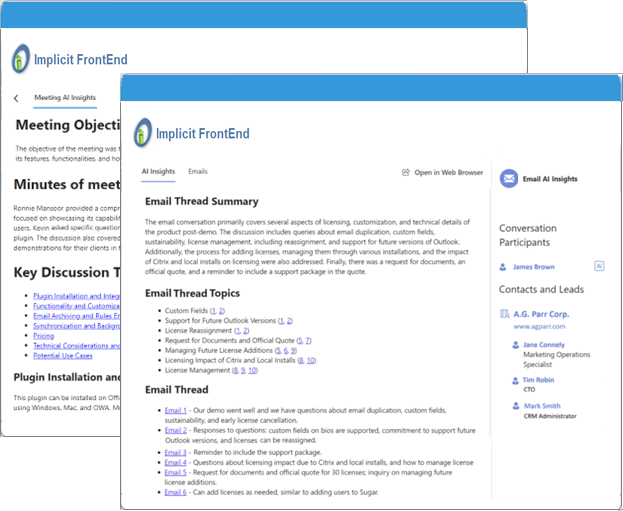
Use AI to condense long and complex email threads into concise summaries, eliminating redundant reading and allowing you to focus on key points, decisions and action items.

Summarize Online Meetings
AI generates concise summaries of online meetings highlighting the topics discussed, decisions taken and follow-up action items. Team members can rely on AI Insights to stay informed without having to attend every meeting.

Generate AI Insights for CRM Records
Generate AI insights for contacts, accounts, opportunities, cases etc. Get up to speed quickly, even if you were not part of the original conversation.

Find Emails by Topic
Easily find emails where certain topics were discussed with customers. Extract list of key topics and drill down to review the corresponding emails.

Minimize Manual Work with AI
Save time and eliminate redundant manual data entry by having AI automatically create CRM records based on information that it extracts from emails and meetings.

Save and Share AI Insights via CRM
Keep your team members aligned by sharing AI insights via the CRM, allowing them to catch up on a conversation's key points without having to read entire email threads or participate in every meeting.
Benefits for your Entire Sales Team
Product Demo
See Implicit AI Edition in action
Watch how your entire sales team can benefit from Implicit AI insights.

TESTIMONIALS
What our clients say
matters the most to us
FAQ
Frequently Asked Questions
What is the difference between Implicit FrontEnd AI and Copilot?
Outlook and Teams Copilot provide AI summaries for those users who participate in email conversations and meetings. Implicit FrontEnd AI Insights’ true value is in compressing organizational knowledge and making it available through the CRM so that all CRM users can come up to speed very quickly instead of spending 20–30 minutes reading emails or listening to recordings.
Another key difference is the fact that Implicit FrontEnd AI Insights are generated in the context of the CRM and utilize CRM data (e.g., CRM history of accounts, opportunities, etc.) while Outlook Copilot summarizes emails and Teams Copilot summarizes meetings without having any CRM context.
What happens to the data when generating AI Insights?
Implicit FrontEnd AI utilizes Microsoft 365 Azure, Claude and OpenAI services so that your data never leaves Microsoft 365. Emails and meetings data is communicated between Microsoft 365 Exchange online, Microsoft Teams, Microsoft Azure and users’ desktops. AI input data is sent from users’ desktops to Microsoft Azure AI service, and AI output data is retrieved from Azure AI service, stored in the CRM and viewed on users desktops. Neither the input data, nor the output data are transmitted to Implicit or to any external third-party service.
Do you support Exchange on-prem?
Implicit FrontEnd fully supports Exchange on-prem. But the AI edition requires Microsoft 365.
Is the architecture the same as Implicit FrontEnd (non-AI Edition)?
Yes, the architecture and the actual software is exactly the same as Implicit FrontEnd non-AI edition. In fact the only difference is the license key that you are using.
Can an administrator centrally manage AI settings?
Yes, the administrator can centrally manage AI settings for all users including AI model, end-points and accounts, enabling/disabling AI Insights for emails and meetings, AI quota, etc.
Stay in Outlook. We'll bring the CRM to you.
Start your free trial today. No credit card required.