WHY IMPLICIT
Everything you need to keep Outlook and your CRM in sync
Eight powerful reasons why IT teams choose Implicit Exchange Connector to keep their CRM and Exchange environment perfectly aligned.
Microsoft 365 & on-prem Exchange

No Desktop Installation Required
Runs entirely server-side, so there is no software to install, update, or support on end-users' desktops - deploy across your whole organization without the client-side burden.

Centralized Administration
Centrally installed, configured and managed by your IT / CRM administrator, reducing any ongoing support and user training overhead.

Full Two-Way Synchronization
Two-Way synchronization of calendars and contacts keeps users' Outlook and CRM data consistently in sync without any user involvement.

Automatic Email Archiving
Inbound and outbound emails from/to CRM contacts or leads can be automatically archived to their related CRM records. Crucial for any compliance‑regulated industry.

High-Performance, Scalable Architecture
Scalable solution from single-server (or VM) for SMB to a full server-cluster for the enterprise. Handles large-scale user count and email traffic as your organization grows.

On-Prem or in the Cloud
Deploy in-house or in the cloud (e.g. AWS) — choose the infrastructure that best fits your organization's needs.

Rule-Based Automation
Define archive rules based on contacts, leads, accounts, email addresses, domain names, or words and phrases in the subject line for intelligent, customizable email handling.

Optional Outlook Side-Panel
Combine the benefits of server-side sync with the rich functionality of the Implicit FrontEnd Outlook side-panel to let users view, update, or create CRM records directly from Outlook.
Product Demo
See Implicit Server-Side Connector in action
Watch how IT teams deploy Implicit server-side connector to keep Microsoft 365 or Exchange on-prem and their CRM perfectly in sync—no desktop installs, no manual archiving, no missed emails.

TESTIMONIALS
What our clients say matters
the most to us
FAQ
Frequently Asked Questions
Where is the software installed?
Implicit Exchange Connector (referred to as the “Gateway”) is installed on a Windows server (physical or a virtual machine). It can be installed on-prem or in the cloud, in a location where it can access both the CRM server and Microsoft 365/Exchange. It is typically installed by an IT admin and managed by your CRM admin.
How does it work?
The software runs continuously in the background as a Windows service, connecting to both the CRM server and Exchange online/on-prem and synchronizing between them.
An admin configuration tool is provided to allow the admin to configure the following:
- Connections with the Exchange server and the CRM server.
- List of Exchange mailboxes and a corresponding list of mapped CRM user accounts.
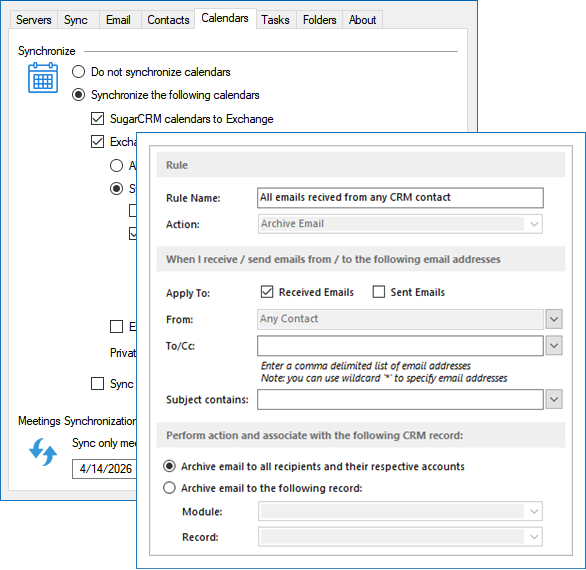
- Email archiving rules for inbound and outbound emails.
- How meetings and contacts should be synced.
- Synchronization settings, including direction, frequency, deletion, teams, etc.
How does the rule-based email archiving engine work?
The configuration tool allows the admin to define rules to archive inbound and outbound email. Rules can be system-wide, such as archiving all emails from/to CRM contacts or leads. Rules can also be defined at an account level (based on domain name) or at a single contact level (based on email address). You can also customize rules further by combining text or phrases in the subject line and defining which CRM records they should be archived to.
Do users have any control over which emails get archived?
Yes. You can define an Outlook category that users can select and associate with emails in Outlook to instruct the Gateway to archive those emails.
How does synchronization work?
The configuration tool allows you to select the direction of synchronization (Exchange to CRM, CRM to Exchange, or both) for each of the Exchange items. For the Exchange to CRM direction, you can select to sync all items in the corresponding folder, or only items with a specific Outlook category.
For meetings you also have the option of specifying to sync only meetings with CRM contacts/leads.
Set It Up Once. Let It Run Forever.
Start your free trial today. No credit card required.